




Introduction (SMS Two-Factor Authentication (2FA)
Two-factor authentication is supposed to make your accounts more secure. But not all 2FA methods are equal. SMS based 2FA, where a code is sent to your phone via text message, is one of the most common methods. It is also one of the most dangerous. Attackers can bypass SMS 2FA through SIM swapping, SS7 network flaws, and phishing attacks. This guide explains why SMS 2FA is fundamentally flawed, how SIM swapping works, and what you should use instead. We will cover the mechanics of SMS 2FA, the step by step breakdown of a SIM swap attack, and better alternatives like hardware keys, authenticator apps, and passkeys.
Why SMS 2FA Feels Secure but Is Fundamentally Flawed
When you enter your password and receive a code by text, it feels like strong security. In reality, SMS 2FA is built on a weak foundation. The telephone network was never designed for secure authentication. SMS messages can be intercepted, redirected, or stolen. The security you feel is an illusion.
The Mechanics of SMS Based Two-Factor Authentication
SMS 2FA works by sending a one time code to your registered phone number. You enter this code after your password. The code is generated by the service and transmitted over the cellular network. The problem is that this transmission is not encrypted end to end. It can be intercepted at multiple points.
What Is SIM Swapping and How Does It Actually Work?
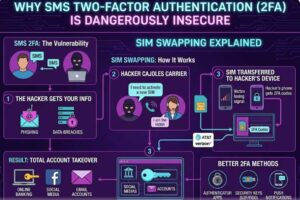
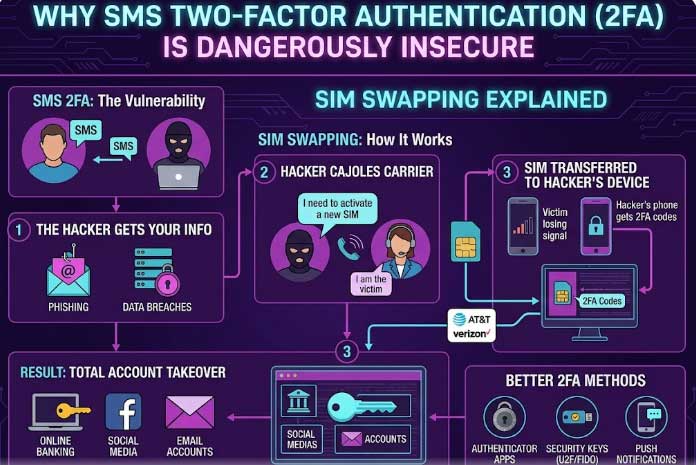
SIM swapping is an attack where a criminal convinces your mobile carrier to transfer your phone number to a SIM card in their possession. Once they control your number, they receive all your SMS messages, including 2FA codes. This allows them to access your accounts even if they do not have your password.
Step by Step Breakdown of a Typical SIM Swap Attack (SMS Two-Factor Authentication (2FA)
- The attacker gathers personal information about you from social media, data breaches, or phishing.
- They contact your mobile carrier pretending to be you.
- They claim to have lost their SIM card and need a replacement.
- They provide enough personal details to pass security questions.
- The carrier activates a new SIM card with your number.
- Your phone loses signal and the attacker gains control of your number.
- They use your number to receive 2FA codes and access your accounts.
How Attackers Social Engineer Mobile Carriers to Steal Your Number
Attackers use social engineering to trick carrier employees. They gather your name, address, date of birth, and sometimes the last four digits of your social security number. This information is often available through data breaches or public records. With this information, they can impersonate you.
Real World SIM Swapping Cases and Major Breaches (SMS Two-Factor Authentication (2FA)
High profile SIM swapping cases have targeted cryptocurrency investors, social media influencers, and journalists. In one case, an attacker stole over $20 million in cryptocurrency by SIM swapping a single phone number. These cases demonstrate the real world impact of this attack.
Why SMS Codes Can Be Intercepted Even Without a Full SIM Swap
Even without a full SIM swap, SMS codes can be intercepted. The SS7 protocol has known vulnerabilities that allow attackers to redirect SMS messages. This is a network level flaw that is difficult to fix. Attackers can also use phishing to trick you into forwarding the code.
The Role of Social Media in Making SIM Swapping Easier(SMS Two-Factor Authentication (2FA)
Social media provides attackers with the personal information they need to impersonate you. Your birthday, location, family members, and even your pet’s name can be used to answer security questions. Limiting what you share on social media reduces this risk.SMS Two-Factor Authentication (2FA)
SMS 2FA vs. App Based Authenticators: A Direct Security Comparison
SMS 2FA relies on the cellular network. App based authenticators generate codes locally on your device. They are not vulnerable to SIM swapping or SS7 interception. Hardware keys provide even stronger protection. App based authenticators are a significant improvement over SMS.
How SIM Swapping Bypasses Your Password and Backup Codes
Once the attacker controls your phone number, they can use the forgot password feature on many services. They receive the password reset link or code via SMS. They can also use backup codes sent to your phone. Your password becomes irrelevant.
Financial Losses and Identity Theft Risks from SMS 2FA Failures
SIM swapping can lead to drained bank accounts, stolen cryptocurrency, and opened credit lines in your name. The financial losses can be devastating. Identity theft can take years to resolve.
Why Even Tech Savvy Users Fall Victim to These Attacks
Even security conscious users can fall victim because the attack targets the carrier, not the user. You can have a strong password and still be vulnerable. The weak link is the mobile carrier.
Carrier Security Gaps That Enable SIM Swapping in 2026
Many mobile carriers still rely on outdated security questions that can be answered with publicly available information. Some carriers do not require proper verification before activating a new SIM. These gaps are slow to close.
Legal and Regulatory Challenges Around SIM Swap Protection
Laws around SIM swapping vary by jurisdiction. Some states have implemented stricter regulations, but enforcement is inconsistent. The burden of protection often falls on the user.
Better Alternatives: Hardware Keys, Authenticator Apps, and Passkeys (SMS Two-Factor Authentication (2FA)
Hardware security keys like FIDO2 provide phishing resistant 2FA. App based authenticators like Google Authenticator or Authy are more secure than SMS. Passkeys offer a modern alternative that combines security with convenience. Use these instead of SMS 2FA.
How to Detect If Your Number Has Been Swapped or Compromised
Signs of a SIM swap include your phone losing signal suddenly, being unable to make calls or send texts, and receiving notifications about account changes. Act quickly if you suspect a swap.
Proactive Steps to Secure Your Account Beyond SMS 2FA (SMS Two-Factor Authentication (2FA)
- Use hardware security keys for important accounts.
- Use app based authenticators for others.
- Set a PIN or password on your mobile carrier account.
- Use a separate phone number for 2FA that is not publicly linked to you.
- Monitor your accounts for unusual activity.
The Growing Threat of SIM Swapping in an AI Driven Fraud Era
AI makes social engineering more convincing. Attackers can generate realistic voice clones and personalized phishing messages. SIM swapping attacks are becoming more sophisticated.
Common Myths About SMS Two-Factor Authentication Debunked
- Myth: SMS 2FA is secure because it is two factor.
- Truth: SMS can be intercepted and redirected.
- Myth: Only celebrities get SIM swapped.
- Truth: Anyone can be targeted.
- Myth: A strong password protects you.
- Truth: SIM swapping bypasses passwords.
Common Mistakes Beginners Make on SMS Two-Factor Authentication (2FA)
- Relying on SMS 2FA for important accounts.
- Sharing too much personal information on social media.
- Not setting a carrier PIN.
- Ignoring signs of a SIM swap.
- Using the same phone number for 2FA and public contact.
Pro Tips for Stronger SMS Two-Factor Authentication (2FA)
- Use hardware keys for your most important accounts.
- Use app based authenticators for everything else.
- Set a carrier PIN or password.
- Use a virtual phone number for 2FA.
- Enable account alerts for changes.
Expert Insights on SMS Two-Factor Authentication (2FA)
Security experts universally recommend against using SMS for 2FA. The risks are too high. App based authenticators and hardware keys are the recommended alternatives.
Real World Applications
This knowledge is used by individuals who want to protect their accounts from takeover. It is also used by security professionals to educate clients.
Actionable Takeaways on SMS Two-Factor Authentication (2FA)
- Stop using SMS 2FA for important accounts.
- Switch to app based authenticators or hardware keys.
- Set a carrier PIN.
- Monitor your accounts.
- Use Worlddumps.site for additional privacy tools.
Summary
SMS 2FA is dangerously insecure due to SIM swapping, SS7 flaws, and phishing. Use hardware keys or app based authenticators instead.
Conclusion of SMS Two-Factor Authentication (2FA)
Protect your accounts by moving away from SMS 2FA. The alternatives are more secure and easy to use.
Call to Action: Visit Worlddumps.site to get Non VBV BINs or clonecards.store to get clone cards, legit dumps with pin and carding materials. Also visit cvvdump.uno to get money swift money transfer service which includes bank transfer, PayPal, CashApp, Venmo, Zelle, and Western Union transfers.
FAQ on SMS Two-Factor Authentication (2FA)
Why is SMS 2FA insecure? SMS messages can be intercepted through SIM swapping, SS7 vulnerabilities, and phishing attacks.
What is SIM swapping? An attack where a criminal convinces your mobile carrier to transfer your number to a SIM card they control.
How does SIM swapping work? The attacker gathers personal information, contacts your carrier, and requests a replacement SIM. Once activated, they receive your SMS messages.
Can SMS codes be intercepted without a SIM swap? Yes, through SS7 network flaws or phishing attacks.
What is the best alternative to SMS 2FA? Hardware security keys and app based authenticators are more secure.
How can I protect myself from SIM swapping? Set a carrier PIN, use app based authenticators, and limit social media sharing.
What are the signs of a SIM swap? Sudden loss of signal, inability to make calls, and account change notifications.
Can SMS 2FA be hacked? Yes, it is vulnerable to multiple attack methods.
Is SMS 2FA better than no 2FA? It is better than nothing, but app based authenticators and hardware keys are much safer.
What is the future of 2FA? Passkeys and hardware based authentication are becoming the standard.


