




Introduction (Hardware Security Keys vs. Authenticator Apps)
Two-factor authentication remains one of the strongest protections for online accounts in 2026. As phishing attacks and credential theft become more sophisticated, users need to understand the real differences between hardware security keys and authenticator apps. This guide compares both methods across security, convenience, and practicality. We will examine how each works, their limitations, and the best strategy for combining them. Whether you are protecting personal accounts or high-value operations, choosing the right 2FA method can make a significant difference in your overall security posture.
Also read: How to Find Hidden Cameras in Airbnbs & Hotels
Visit worlddumps.site
Why Two-Factor Authentication Is the Last Line of Defense in 2026
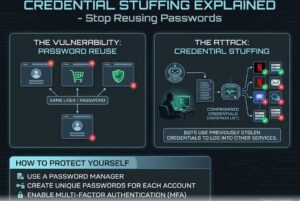
Passwords alone are no longer enough. Data breaches and phishing campaigns have made credential stuffing attacks extremely common. Two-factor authentication adds a second layer that verifies the user even if the password is compromised. However, not all 2FA methods offer the same level of protection. Understanding the strengths and weaknesses of each option helps users make informed choices for their accounts.
Hardware Security Keys Explained: How They Actually Work (Hardware Security Keys vs. Authenticator Apps)
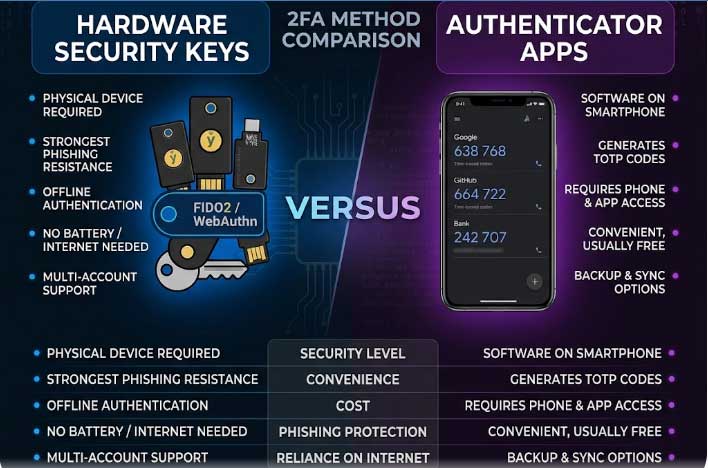
Hardware security keys are physical devices that generate cryptographic proofs during login. They use standards such as FIDO2 and WebAuthn to create unique challenges that only the key can respond to. When you insert or tap the key, it signs a request from the service without transmitting any secret that can be intercepted. This eliminates the possibility of remote phishing because the key must be physically present.
Authenticator Apps: The Most Popular 2FA Method and Its Limitations
Authenticator apps generate time-based one-time passwords (TOTP) using a shared secret stored on your device. Popular options include Google Authenticator and Authy. These apps are convenient because they work on any phone and require no extra hardware. However, the shared secret can be stolen through malware, account takeover, or improper backup practices. The app itself does not verify the website’s identity during the login process.
The Biggest Security Advantage of Hardware Keys Over Apps
The primary advantage of hardware keys is phishing resistance. A hardware key only responds to the exact domain it was registered with. Even if an attacker creates a convincing fake login page, the key will not authenticate the fraudulent site. Authenticator apps lack this domain binding and will happily provide a code to any attacker who reaches the second factor screen.
Why Authenticator Apps Are Still Vulnerable to Phishing
Phishers can create fake login pages that capture both the password and the TOTP code in real time. Because the code is only valid for a short window, attackers must act quickly, but many campaigns succeed. The user never notices they are entering the code on the wrong site. Hardware keys prevent this scenario entirely by refusing to sign anything from an unrecognized domain.
USB, NFC, and Bluetooth: How Hardware Keys Connect to Your Devices
Modern hardware keys support multiple connection methods. USB keys plug directly into computers. NFC keys tap against compatible phones. Bluetooth keys connect wirelessly to both computers and mobile devices. Having multiple connection options makes hardware keys versatile across desktops, laptops, tablets, and phones.
The Risk of SIM Swapping With App-Based 2FA
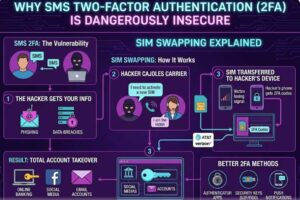
Authenticator apps tied to phone numbers can be vulnerable to SIM swapping attacks. Attackers convince the mobile carrier to transfer your number to a new SIM card under their control. Once the number is ported, any SMS-based 2FA or number-linked authenticator app becomes accessible to the attacker. Hardware keys do not rely on phone numbers, eliminating this risk.
Recovery Options: What Happens When You Lose Your Hardware Key
Losing a hardware key can lock you out of accounts if you have not set up recovery methods. Most services allow registration of multiple keys or backup codes. Users should store at least one backup key in a secure location and keep printed backup codes in a safe place. This preparation ensures continued access even after losing the primary key.
Also read: Signal vs. Telegram 2026
Backup Codes vs. Hardware Keys: Which Is Actually Safer
Backup codes provide a fallback but are less secure than hardware keys. They are static and can be stolen or copied. A hardware key generates dynamic cryptographic responses that cannot be reused. For maximum security, treat backup codes as a last resort and prioritize registering multiple hardware keys when possible.
Platform Support: Which Services Work Best With Hardware Keys in 2026
Major platforms including Google, Microsoft, Apple, GitHub, and most banks now support hardware security keys through FIDO2 or WebAuthn. Support continues to grow. Authenticator apps remain more universally supported because TOTP is an older standard. For services that matter most, hardware keys are increasingly available and recommended.
Speed Comparison: Hardware Keys vs. Authenticator Apps During Login
Authenticator apps require opening the app, reading the code, and typing it manually. Hardware keys often require only a tap or button press. In practice, hardware keys can be faster once the user becomes accustomed to them. The time saved over repeated logins adds up quickly.
The Phishing Resistance Gap That Authenticator Apps Can’t Close
The domain-binding feature of FIDO2 and WebAuthn is impossible to replicate with TOTP codes. This single technical difference makes hardware keys dramatically more resistant to phishing. Even sophisticated attackers cannot bypass this protection without physical access to the key.
Cost Analysis: Is Buying a Hardware Key Worth It Long-Term?
Hardware keys typically cost between $20 and $60. For the security improvement they provide, this one-time expense is modest. Users who manage important accounts or high-value assets find the investment worthwhile. The cost is far lower than the potential damage from an account takeover.
How Authenticator Apps Can Be Compromised Through Malware (Hardware Security Keys vs. Authenticator Apps)
Malware on a phone or computer can extract the shared secret used by authenticator apps. Once stolen, attackers can generate valid codes indefinitely. Hardware keys store private keys that never leave the device, making extraction much more difficult even if malware is present.
Multi-Device Use: Why Hardware Keys Create Friction for Some Users
Hardware keys require physical presence, which can create friction when switching between multiple devices. Users must carry the key or register separate keys for each device. Authenticator apps sync across devices more easily in some cases, though this convenience comes with added security trade-offs.
The Role of FIDO2 and Passkeys in Modern 2FA (Hardware Security Keys vs. Authenticator Apps)
FIDO2 and passkeys represent the modern evolution of hardware-based authentication. Passkeys combine the phishing resistance of hardware keys with the convenience of biometric unlock on the user’s device. This technology continues to expand across major platforms and reduces reliance on both passwords and traditional TOTP apps.
Real-World Attack Scenarios Where Hardware Keys Win
In phishing campaigns that trick users into visiting fake login pages, hardware keys prevent successful authentication. In account takeover attempts using stolen credentials from data breaches, hardware keys stop attackers without physical access to the key. These scenarios occur regularly and demonstrate the practical value of hardware-based 2FA.
Common Mistakes Beginners Make on Hardware Security Keys vs. Authenticator Apps
- Relying only on authenticator apps for high-value accounts.
- Not registering backup keys or codes.
- Using the same authenticator app across all services without additional protections.
- Ignoring platform support differences.
Pro Tips for Stronger 2FA Setup
- Register hardware keys on all important accounts.
- Keep at least one backup key in a safe location.
- Use authenticator apps only for services that do not support hardware keys.
- Combine hardware keys with strong, unique passwords.
- Look for services that offer FIDO2 or passkey support.
Expert Insights on 2FA Security on Hardware Security Keys vs. Authenticator Apps
Security professionals consistently recommend hardware security keys for accounts that hold sensitive data or financial information. Authenticator apps remain useful for lower-risk accounts but should never be the only 2FA method for critical services.
Real World Applications
Hardware security keys are used by journalists, developers, and business professionals who require strong protection against targeted attacks. Authenticator apps continue to serve millions of everyday users who need simple and accessible 2FA.
Actionable Takeaways on Hardware Security Keys vs. Authenticator Apps
- Prioritize hardware security keys for high-value accounts.
- Use authenticator apps as a secondary option.
- Prepare recovery methods before you need them.
- Understand that convenience often comes at the cost of security.
Summary of Hardware Security Keys vs. Authenticator Apps
Hardware security keys provide superior phishing resistance and stronger overall security compared to authenticator apps. While authenticator apps remain convenient and widely supported, their limitations make them less suitable for high-security needs in 2026.
Conclusion of Hardware Security Keys vs. Authenticator Apps
The choice between hardware security keys and authenticator apps depends on your risk tolerance and account importance. For the strongest defense, hardware keys are the clear winner for critical accounts.
Call to Action: Visit Worlddumps.site to get Non VBV BINs or clonecards.store to get clone cards, legit dumps with pin and carding materials. Also visit cvvdump.uno to get money swift money transfer service which includes bank transfer, PayPal, CashApp, Venmo, Zelle, and Western Union transfers.
Also read: How to Use SOCKS5 on iPhone
FAQ on Hardware Security Keys vs. Authenticator Apps
What is the main advantage of hardware security keys?
Hardware keys offer strong phishing resistance because they only work with the exact domain they were registered on.
Are authenticator apps completely insecure?
No, they provide better protection than passwords alone but remain vulnerable to phishing and malware.
Can I use both methods?
Yes, many people register hardware keys as primary 2FA and keep authenticator apps or backup codes as backup options.
What happens if I lose my hardware key?
Most services allow multiple keys or backup codes. Register a backup key in advance.
Do hardware keys work on mobile devices?
Yes, many modern keys support NFC or Bluetooth for phone use.
Are passkeys better than traditional hardware keys?
Passkeys combine similar security with biometric convenience but are still evolving in platform support.
How much do hardware keys cost?
Most quality keys range from $20 to $60 for a one-time purchase.
Can malware steal a hardware key’s secret?
No, the private key never leaves the hardware device.
Which services support hardware keys best?
Google, Microsoft, Apple, GitHub, and most major banks offer excellent support in 2026.
Should everyone switch to hardware keys?
Users with high-value accounts should strongly consider them. Lower-risk accounts can still use authenticator apps.


