







Introduction (How to Know If Someone Restricted You on Instagram)
Instagram offers several privacy features that let users control who sees their content and interactions. One of the lesser known but commonly used options is the Restrict feature. Unlike blocking, restricting someone happens quietly without any notification, which makes it hard to tell if it has happened to you.
In this guide, we will break down exactly how to know if someone restricted you on Instagram. We will cover three silent signs that can reveal the truth. We will also explain the difference between restricted and blocked so you can understand what is really going on.
Whether you are in the USA, Canada, Australia, the UK, or anywhere else, these methods work the same way. By the end of this article, you will know what to look for and what the signs actually mean.
Also read: How to Find Who Owns a Website
1. What Is the Restrict Feature on Instagram (How to Know If Someone Restricted You on Instagram)
The restrict feature on Instagram lets users limit interactions from specific accounts without fully blocking them. When someone restricts you, your comments on their posts become invisible to everyone except you. They also will not receive direct message notifications from you, and your activity status will no longer appear for them.
This feature was introduced to give users more control over unwanted interactions while avoiding dramatic confrontations. Because it works silently, most people never realize they have been restricted.
2. Sign 1: The Activity Status Blackout (How to Know If Someone Restricted You on Instagram)
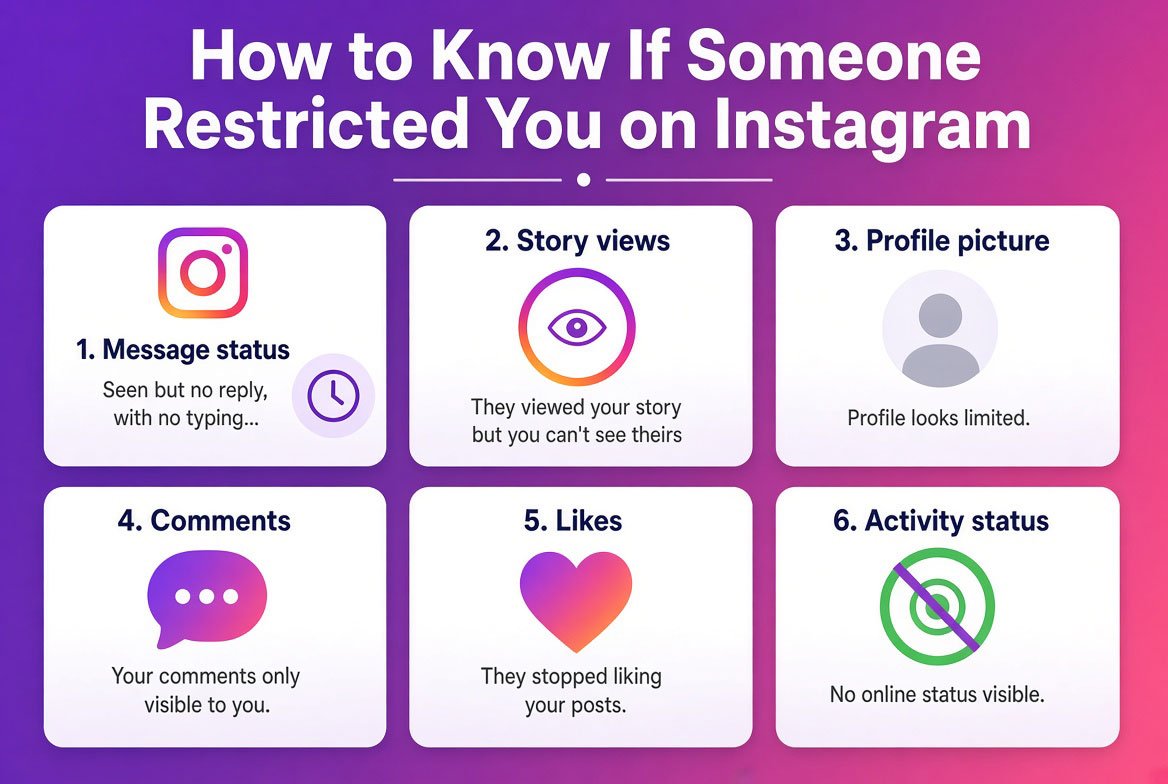
One of the clearest signs someone restricted you is the sudden disappearance of their activity status. Normally, if both accounts follow each other or have interacted before, you can see when they were last active.
If you suddenly cannot see their activity status at all while you can still see it for other mutual connections, this could indicate they restricted you. Note that activity status can also be turned off manually, so this sign alone is not always conclusive. Combine it with other signs for stronger evidence.
3. Sign 2: The Ghost DM Sent vs Seen (How to Know If Someone Restricted You on Instagram)
Another subtle sign appears in your direct messages. When someone restricts you, messages you send will still show as delivered with a checkmark. However, they will never show as seen, even if the person is active on Instagram.
This happens because restricted accounts do not trigger notifications, so the recipient may never open the chat. Over time, if every message you send stays on sent and never moves to seen, while their profile shows normal activity elsewhere, restriction becomes likely.
4. Sign 3: The Alt Account Comment The 100 Percent Proof (How to Know If Someone Restricted You on Instagram)
The most definitive way to confirm restriction is by using an alternate account. Create or log into a second Instagram account that the person has not restricted. From this alt account, try commenting on one of their posts.
If the comment from your main account remains hidden but the same comment from the alt account appears normally, you have clear proof of restriction. This test works because restricted comments are only visible to the commenter and the account owner.
5. Restricted vs Blocked on Instagram Explained (How to Know If Someone Restricted You on Instagram)
Many people confuse restrict with block. When someone blocks you, you cannot find their profile, see their posts, or message them at all. Their profile will show as unavailable or not found.
When someone restricts you, you can still view their public posts and stories if they allow it. You can also message them, though those messages will not notify them. The key differences are visibility of comments and notification behavior. Restricted accounts still appear normally in searches and can be followed unless the profile is private.
Also read: How to Find the Owner of a Phone Number
6. What Can They Actually See When Restricted (How to Know If Someone Restricted You on Instagram)
If you are restricted, the other person can still see your profile, posts, and stories depending on privacy settings. They will not see your comments on their content, and they will not receive pop up notifications for your direct messages.
Their activity status remains hidden from you, and your messages will sit in their inbox unread unless they manually check. They can still message you normally if they choose to.
7. How to Unrestrict Someone on Instagram (How to Know If Someone Restricted You on Instagram)
If you discover you have restricted someone by mistake or want to reverse it, the process is simple. Go to the restricted account in your list under settings, privacy, restricted accounts. Tap the account and select unrestrict. Once removed, normal interactions resume immediately.
8. Common Mistakes When Checking for Restriction (How to Know If Someone Restricted You on Instagram)
People often assume a lack of activity status means restriction, but many users simply turn this option off for everyone. Another mistake is sending multiple direct messages without considering that the person may have the notification setting disabled.
Some users create alt accounts too aggressively and risk violating Instagram terms. Always use legitimate methods and avoid spamming.
9. Pro Tips for Confirming Restriction (How to Know If Someone Restricted You on Instagram)
Use the alt account test only after observing the first two signs. This confirms restriction without unnecessary actions.
Check during times when you know the person is usually active online. Consistent patterns over several days strengthen the evidence.
Compare behavior with other accounts you interact with normally. This helps rule out general glitches or settings changes.
10. Expert Insights on Instagram Privacy Features (How to Know If Someone Restricted You on Instagram)
Instagram designed the restrict feature to give users control without the finality of a block. Experts note that many people use it to manage online stress or unwanted attention quietly. Understanding these tools helps maintain healthy boundaries on social media.
11. Real World Applications on How to Know If Someone Restricted You on Instagram
People use these signs to understand changing dynamics in personal or professional relationships. Businesses sometimes check interactions to see how clients or followers engage with content.
Knowing these signs also helps users decide whether to reach out differently or respect the other persons boundaries.
12. Actionable on Takeaways How to Know If Someone Restricted You on Instagram
Observe the three signs over a period of days rather than jumping to conclusions from one interaction.
Use an alt account carefully and only for confirmation.
Respect privacy choices even if they feel personal.
If the signs point to restriction, consider direct but polite communication off Instagram if appropriate.
13. Summary of How to Know If Someone Restricted You on Instagram
Knowing how to tell if someone restricted you on Instagram comes down to three silent signs. The activity status blackout, messages that stay on sent, and the alt account comment test provide reliable clues. Restricted is different from blocked, and understanding both helps clarify what is happening.
These methods work globally and require no extra tools beyond your Instagram account.
14. Conclusion of How to Know If Someone Restricted You on Instagram
You now have practical ways to determine if someone has restricted you on Instagram. Watch for the activity status change, check message delivery, and use an alt account for final proof. Remember that restriction is a private choice, and these signs simply give you information.
Use this knowledge responsibly and focus on positive online interactions.
For those looking to take their OSINT work to the next level, having access to reliable tools and resources makes all the difference. Visit cvvdump.com or Worlddumps.com to get legit dumps with pin and carding materials that complement your archiving toolkit.
Also read: How to View Deleted Websites & Tweets
15. Frequently Asked Questions (How to Know If Someone Restricted You on Instagram)
What is the difference between restricted and blocked on Instagram? Restricted hides comments and mutes notifications but still allows profile viewing. Blocked completely removes access to the profile and prevents all interaction.
Can a restricted Instagram account see my stories? Yes, unless your story privacy settings exclude them specifically. Restriction does not automatically hide stories.
How do I know if someone restricted me versus just ignoring me? The alt account comment test provides the clearest confirmation. Activity status and message seen status add supporting evidence.
Can anyone block or restrict you on Instagram? Yes, any account can restrict or block another account at any time through the privacy settings.
How to unrestrict on Instagram? Go to your settings, privacy, then restricted accounts. Select the person and choose the unrestrict option.


